Free Trial for 120+ Creative Classes
Search & Section Navigation

Shopping
Style NewsTrends & InspoShoes & AccessoriesBest Beauty ProductsHome DecorGift Guides
Self Care
Beauty & Skincare NailsHairMakeupHealthOrganization & CleaningFinancial WellnessA Better Work LifeCreativity & DIY
Celebrity
Celeb StyleRed Carpet Celebrity Couples
Entertainment
TV ShowsMoviesBooksMusic
HOROSCOPES
HoroscopesAsk An AstrologerZodiac Signs
Food
Food News & Menu UpdatesRecipesHealthy EatingAppetizersDessertsCocktails
More
TravelHolidaysRelationships & ParentingGamesBrit + Co PicksSelfmadeDIY ClassesDIY GuidesVideos
Shopping
Self-Care
Celebrity
Entertainment
Horoscopes
Food
Travel
Holidays
Relationships & Parenting
Brit + Co Picks
AboutPressAdvertise With UsClassesCareersContactDo Not Sell My Info
STAY CONNECTED WITH BRIT+CO
Save yourself time and money with these save the dates.
Make Your Own Save the Dates With Watercolor and Illustrator
By Lee SchellenbergerMar 03, 2016
Lee Schellenberger
As Brit + Co’s Art Director, Experiential, Lee zips around Brit HQ designing interactive events, creative content, and fine tuning online classes. Her fave ways to spend a weekend are bingeing on chef shows, retreating to the mountains, and consuming noodles of all kinds.
Recommended for you
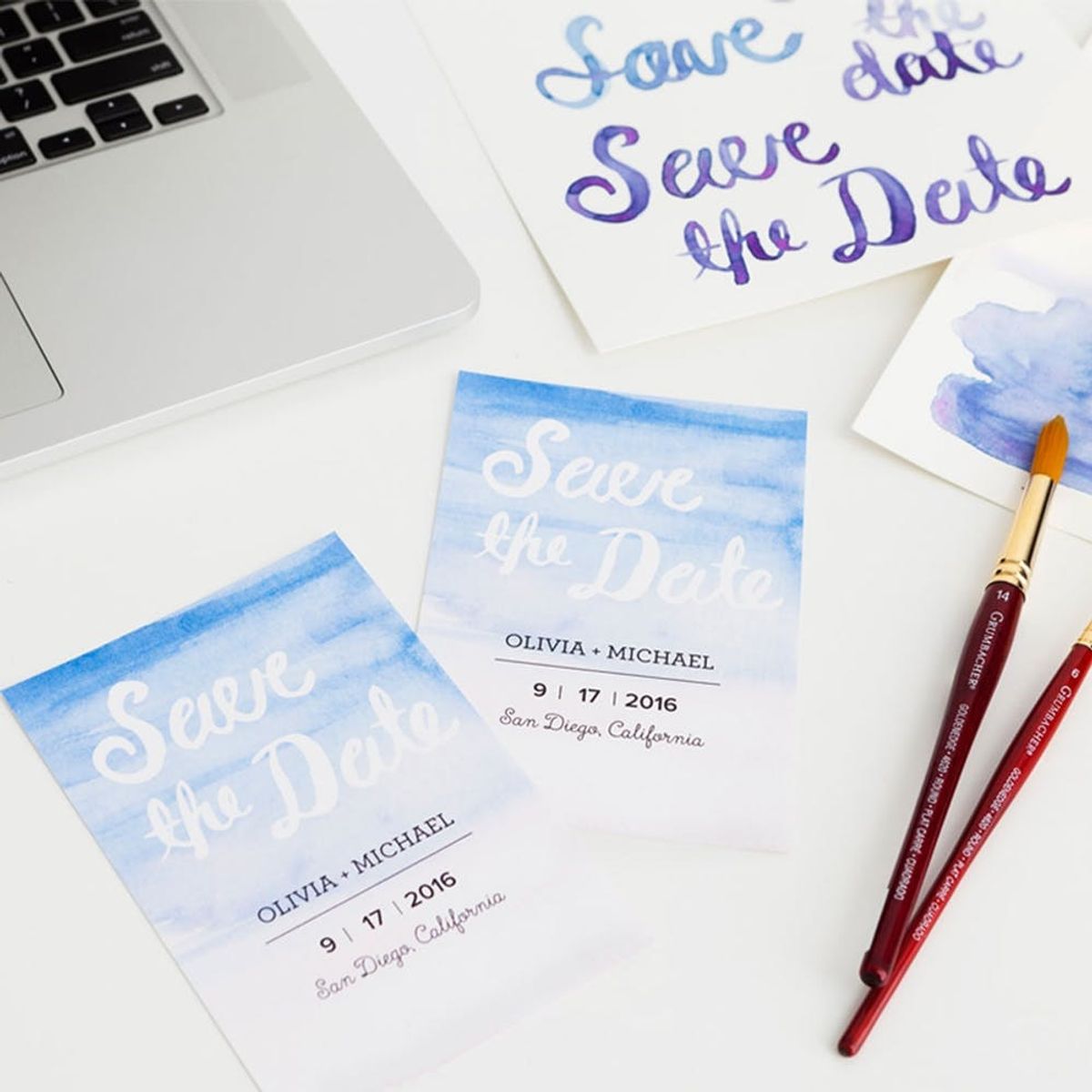
We all know that wedding planning (or party prep of any kind) takes a lot of time, money and pretty stationery. To check off one item on that list, here’s a simple, budget-friendly DIY that combines art and tech for the easiest save the dates EVER! This is the first time that I’ve made invitations like this, and I was amazed at how quickly and beautifully these came together. It seriously only took about 30 minutes of painting by hand and 30 minutes of designing in Adobe Illustrator!
We’re fully taking advantage of the current watercolor trend here by channeling its flowy, easy-going qualities that anyone can recreate with a little bit of practice. While more intricate invitations require a lot more work and illustration, these are completely beginner-friendly, so you have no excuse not to give it a try! We used skills and techniques from our Watercolor Painting online class and our Adobe Illustrator online classes, so if you’re nervous about trying this out for yourself, sign up for a class, and you’ll be a pro in no time!
Materials:
— paintbrushes (here and here)
Additional Tools + Programs:
— Adobe Illustrator downloaded onto your computer (free trial HERE)
— scanner
Instructions:
1. Practice painting a light watercolor wash onto a sheet of paper. Try blending colors and creating light-to-dark gradients.
2. Paint your names and/or phrases onto another piece of paper using your thinnest brush and more saturated watercolor paint.
3. Scan in your favorite pages of lettering and watercolor washes, and save as a .JPEG.
4. Create a new document in Adobe Illustrator, and then open up your scanned .JPEGs in Illustrator as well.
5. Image trace and expand your scanned lettering, and delete all versions of your names or phrases that you’re not going to use.
6. Position and size your chosen lettering on top of your watercolor background in the new Illustrator document.
7. Add text boxes to your document, and fill with the important event details.
8. Save as a .PDF with crop marks and bleeds for print.
9. Print out your finished file, and trim down the edges to the crop marks positioned in all four corners.
10. Pop your save the dates in envelopes, address to your guests and send them out!
Grab your watercolor supplies, start downloading your free trial of Adobe Illustrator and you’re good to go!
Watercolor Wash + Lettering
First up is the watercolor wash. Tape down the edges of a piece of watercolor paper using painter’s tape, and mix up some paint in your chosen colors. For the first wash, you’ll want to use a very light, watery version of your first color, and quickly swipe it across the top of your page with a large brush. While the paint is still wet, layer on slightly darker and darker versions of that color until you get a nice gradient. Repeat with a second color on the bottom edge of your page, and work up to the middle. Blend the lightest versions of your two colors together in the center to tie everything together. Note: This takes a LOT more water than you’d think, so start light and build up darker colors as you go.
Now for the lettering portion! Take your thinnest brush, dip it into a more saturated color than you were working with previously and start practicing your lettering. Here we’re practicing on one sheet of paper, but feel free to keep practicing on multiple sheets until you get it down. Nervous about lettering? You guessed it — we’ve got a class for that. Check out our Brush Calligraphy online class and get the low-down on creating pretty painted phrases.
If, like us, you practiced on a few pages behind the scenes, pick out your faves and let them dry completely before starting part two of this DIY.
Layout in Illustrator
Once your hand-painted pieces are totally dry, go ahead and scan them in. Make sure to select “Color” and “300 dpi” in your scan settings and save as a JPEG. This means that your artwork will be print quality when you go to print out your final designs!
Open up Adobe Illustrator and start a new document. Set the dimensions to whatever size you prefer (we chose 4 x 6 inches, standard postcard size), and set your bleed to 0.125 inches on all sides. Lastly, since you’ll be printing this out at the end, set your color mode to “CMYK” and click “OK.”
Now open your scanned JPEGs of both the watercolor wash and the brush lettering, and drag the wash image over to your newly created document. Take the time to position and resize your watercolor wash image on your art board until you’re happy with it.
Next up, we’ll go ahead and vectorize your scanned brush lettering. On the JPEG file, select the whole page of lettering and select “Image Trace.” The image trace function allows you to select “3-color” from a dropdown list, which will give your lettering more exact definition than the default setting. Next, click “Expand” to create your vector lettering.
Now it’s time to clean house. Pick out your favorite version of your phrase and delete all the other versions around it. Select all pieces of your final phrase and click on “Unite” in your “Pathfinder” window to make it all one color.
Select and drag your phrase over to the new document, and lay it on top of your watercolor background. We turned the phrase to white to make it really pop against the blue wash (and to hide any imperfections ;)
Now this part isn’t totally necessary, but it will help you see what your final design will look like once it’s done. Draw a rectangle the size of your document (including that 0.125-inch bleed) and select both the rectangle and your watercolor background. With both items selected, right click and select “Make Clipping Mask” to trim down your background.
Add a text box on top of your layout and fill in the important details of your save the date or invitation. Play around with a few different fonts, and see what you like!
Once you’re happy with your design, it’s time to get your file print-ready. Save your file as a “PDF,” and select “Trim Marks” and “Use Document Bleed Settings” in the “Marks and Bleeds” section. Click on “Save PDF,” and you’re ready to print!
The Final Product
Print out your save the dates at home on high quality card stock, or take your .PDF file to a professional printer. Make sure to ask them for a printed proof to make sure the colors look right to you before you ask them to print the whole job. Use those little crop marks in the four corners of your print to trim off the eighth of an inch color bleed with an X-ACTO knife.
Match your save the dates to some envelopes and send ’em out!
How will you mix hand painting and digital design to make something unique? Show us your project by tagging us on Instagram and using hashtag #iamcreative!
adobebrit kitsillustrationinvitationswatercolorwedding planning
The Latest
Gifts
The Ultimate Holiday Gift Guide For New Parents (And Their Little Ones)
Nov 23, 2026
The Secret Layer That Makes Your Holiday ‘Fits Feel So Comfortable
Nov 24, 2026
Sponsored
Meet the Inspiring Founder Behind A New Grief Collective
Aug 26, 2022
This Life-Changing Hack Relieved My Mental Load For Good
Apr 13, 2026
Nebula Reviews: Psychic Readings That Offer More Than Just Predictions
Feb 05, 2026
Make Your Inbox Your Happy Place
Get freebies, inspo, & more delivered to you.
This field is required.
Email is invalid.
You subscribed successfully!
Something went wrong!
Sign up for our newsletter and never miss out!
This field is required.
Email is invalid.
You subscribed successfully!
Something went wrong!
The Top 5
9 Cozy Ways To Romanticize A Solo Thanksgiving
Nov 19, 2026
'The Comeback King' Trailer: Madelyn Cline & Glen Powell Sing It Out in Hilarious New Comedy
Nov 19, 2026
18 Chic Thanksgiving Tablescape Ideas (Plus Easy DIYs)
Nov 20, 2026
The Secret Layer That Makes Your Holiday ‘Fits Feel So Comfortable
Nov 24, 2026
Dakota and Elle Fanning Star in Emotional First Trailer for ‘The Nightingale’
Nov 19, 2026
EXPLORE MORE OF BRIT + CO
Selfmade
A business accelerator for early-stage female founders with live workshops, 1:1 mentoring, online courses, and curated business support. Visit
Subscribe to B+C
Get your weekly dose of inspo, pop culture, and creativity — straight to your inbox. Subscribe to the Brit + Co newsletter! Visit
Classes
Explore 120+ Creative Courses in our All-Access Pass or feed your creativity with 45+ B+C Baking + Cooking Bundle . Visit
More For You
test var 2026-09-26
Mikhail Nilov/Pexels
Missing 'The Other Bennet Sister'? BritBox Is Already Adapting Another Jane Austen Book
Nov 12, 2026
Huge news for BritBox and Jane Austen fans: on the heels of The Other Bennet Sister, we're getting a brand new TV show inspired by Persuasion. The Other Elliot Sister is coming to BritBox soon and will follow another overlooked sister in the Jane Austen universe as the next installment of the brand new Austen Untold anthology franchise series. Think American Horror Story, but less horror and much ... Keep reading
Keep Reading Show less
Woodstock Chimes: The Gift That Keeps Playing, Every Season
Woodstock Chimes
Woodstock Chimes: The Gift That Keeps Playing, Every Season
Nov 24, 2026
Here's a gift test. Think of the last ten presents you got. Now think of the one you can still picture exactly where it is in your house. If you've ever been given a Woodstock Chime, you just thought of it. That's the whole pitch. In a season of candles and gift cards, a wind chime that plays a real melody when the breeze moves is the present people still bring up years later. And this isn't any ... Keep reading
Keep Reading Show less
Lily Craigen/Sally Flegg, Courtesy of Netflix; Amazon
Meet the Cast of Netflix's New Hockey Romance 'Icebreaker'
Sep 28, 2026
Netflix is finally adapting one of the OG BookTok favorite hockey romance shows: Icebreaker. It's no surprise that with the success of Off-Campus and Heated Rivalry, TV fans are clamoring for more hockey romance shows.The story follows Anastasia Allen, who's a competitive figure skater determined to become an Olympic champion. But everything changes when she's faced with sharing her ice time with ... Keep reading
Keep Reading Show less
HBO
'The Gilded Age' Returns This Weekend. Here's What You Need to Know.
Oct 28, 2026
If you've been feeling absolutely distraught since the end of The Gilded Age season 3 — where the fate of Bertha (Carrie Coon) and George's (Morgan Spector) relationship was left up the air while Peggy (Denée Benton) got engaged to Dr. William Kirkland (Jordan Donica) — then you're definitely not alone. I have been beside myself waiting for new episodes to air so we can find out exactly what ... Keep reading
Keep Reading Show less
Amazon
14 Cozy Cottagecore Books To Curl Up With This Fall
Oct 19, 2026
Some of my favorite books of all time fall into the “cottagecore” category. Reading, by nature, is one of the most cottagecore activities you can engage in, since it embodies the art of slow living. Additionally, immersing yourself in a book is extremely beneficial for your mental health, with studies showing that reading can lower your stress levels by as much as 68%. And isn’t that what the ... Keep reading
Keep Reading Show less
See More
Getty
The Secret Layer That Makes Your Holiday ‘Fits Feel So Comfortable
Nov 24, 2026
Dressing for the holidays can bring out our boldest fashion instincts. The flirty velvet midi, the slinky satin skirt, the knit dress that works just as well at the office party as it does at mom’s house on Christmas Eve. Then, somewhere between the first hour and the third, you feel that familiar friction: thigh chafe.We’ve all been there, it’s so common, but really you need the right layer ... Keep reading
Most Popular
How To Create A Consistent And Authentic Brand Story On Social
May 25, 2023
Sponsored
3 Delicious Spring Dinners You Can Make In 15 Mins!
Apr 01, 2025
3 Easy Holiday Decor DIYs Made from Repurposed Cards
Dec 13, 2016
Evergreen: Whimsy for Every Season (Starring Giddy the Goose)
Nov 24, 2026
Plow & Hearth: The Heart of Your Home, Every Season
Nov 24, 2026
- About
- Press
- Advertise With Us
- Classes
- Careers
- Contact
- Do Not Sell My Info
©2026 Brit Media, Inc. All rights reserved.Terms of Service·Privacy Policy·Archives· Change Privacy Settings
STAY CONNECTED WITH BRIT + CO